Top 10 Firewall Security Software in 2021
Firewall security software blocks suspicious content from entering an organization’s network, thereby securing all company devices and data. Here is a list of the top 10 firewall security software in 2021.
Firewall security software is defined as a barrier between the organization’s network and network traffic. It follows a set of configured rules to figure out which incoming (and sometimes outgoing) data is legitimate and trusted. It is an integral part of cybersecurity. This article introduces you to firewall security software, its key features, and the top ten firewall security software solutions in 2021.
Table of Contents
What Is Firewall Security Software?
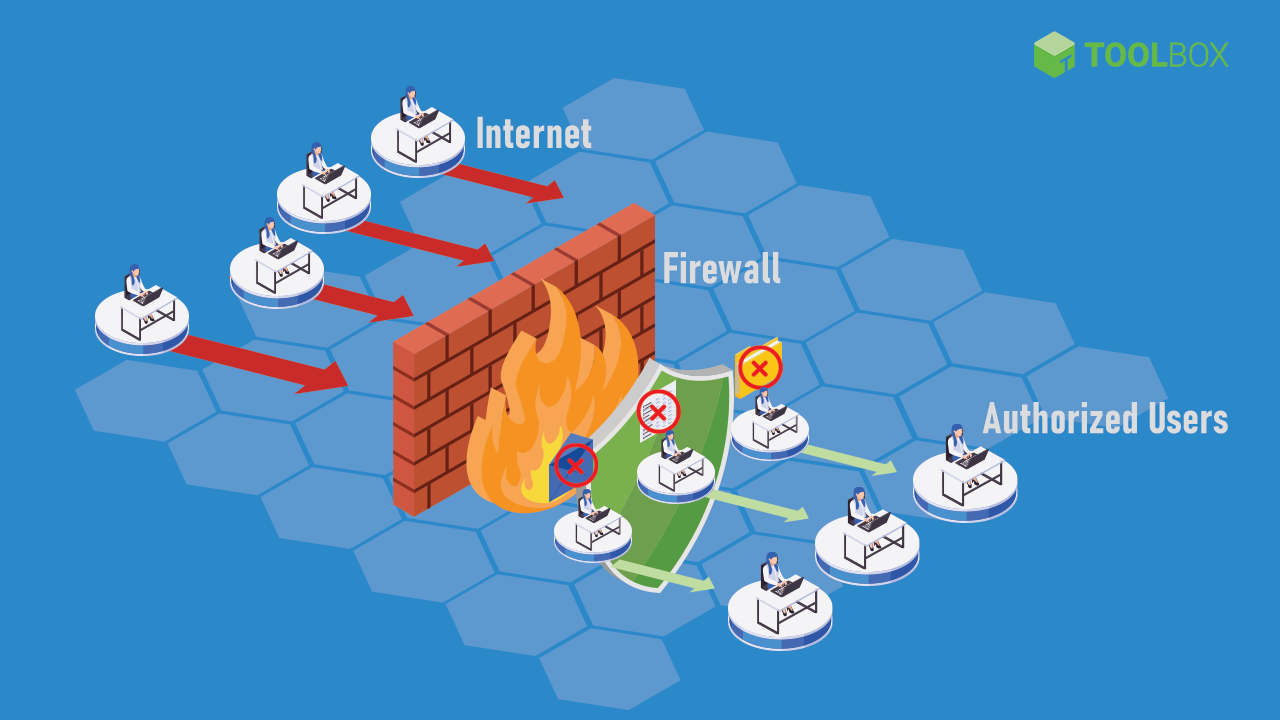
Firewall security software is a barrier between the organization’s network and network traffic. It follows a set of configured rules to determine which incoming (and sometimes outgoing) data is legitimate and trusted. It is an integral part of cybersecurity.
A firewall is a network device or program that filters and keeps out malicious content. Firewall security solutions can be based on hardware, software, virtual machines, or deployed on the cloud. Most organizations employ a combination to ensure maximum network security. Even a single compromised device on an organization’s network can bring all systems down. This would be especially bad for companies storing large amounts of private user data.
According to the 2020 State of Malware Report by MalwareByte Labs, malware detections on business endpoints have increased by 13% over the previous year. This indicates that the number of malicious players posing security threats to businesses is on the rise. An appropriate firewall software will protect the organization from denial of service (DDoS) attacks, spam, viruses, OS-related bugs, email session hijacking, application backdoor exploitation, and many other threats. As such, it is safe to say that a firewall security system is imperative for organizations of all sizes.
How Firewall Security Works
Firewalls work by analyzing packets of data against a set of rules set up by the network administrator. There are three ways in which firewall security software primarily works:
-
- Filtering packets: This involves analyzing packets of incoming data and blocking them by checking security rules for valid IP protocol, port number, or IP address. Examples of protocols include HTTP (web traffic), FTP (upload and download files), telnet (to perform commands on a remote computer), and SMTP (email).
- Proxy: This involves an intermediate system that intercepts all traffic and validates it before passing it to the organization’s network.
- Stateful inspection: This involves establishing active connections by usually marking certain parts of outgoing data. This is then compared against the incoming data to see if it is valid.
Most firewall systems employ a combination of all these methods. Various types of firewalls available in the market include:
-
- Packet filtering firewall: This is the most basic type of firewall. It works by only filtering packets. This type cannot be used as a standalone firewall solution, as it cannot differentiate between good and bad traffic. It just follows the protocols and IP address rules set up already. It usually works in tandem with an intrusion prevention software (IPS).
- Stateful inspection firewall: This type of firewall does packet filtering and stateful inspection. Critical parts of incoming data are compared against a trusted database to ensure validity. It usually works in tandem with an IPS as well.
- Application proxy firewall: This firewall acts as an interceptor between outside traffic and the organization’s network. This ensures that protected systems never come in direct contact with incoming traffic. In addition, the proxy validates the packets by actually analyzing all or most of the data for suspicious content instead of just matching it against security policies.
- Circuit level firewall: This firewall ensures that connections and sessions are safe by observing the transmission control protocol. It doesn’t examine data and needs to be incorporated along with an IPS.
- Next-generation firewall (NGFW): Besides the basic packet and state inspection abilities, this type of firewall is trained to tackle the evolving cyberattack landscape using machine learning and artificial intelligence.
Firewalls can be deployed on hosts or on the network. A host-based firewall is deployed on individual devices and maintained separately. It is cheaper and easier to set up but can only work for very small start-ups. Network-based firewalls are designed to work at a network level, protecting multiple devices at once by analyzing incoming and outgoing traffic. It is easier to maintain and provides better security.
Also Read: What Is a Firewall? Definition, Key Components, and Best Practices
Key Must-Have Features of Firewall Security Software
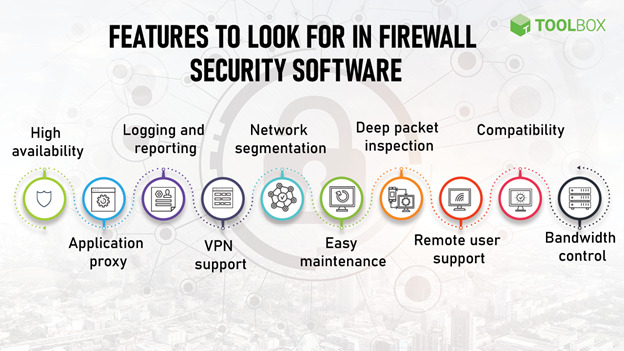
As with any other software, it is important to keep the specific needs of your business in mind while choosing a firewall security software. It is also essential to etch out the scope: what other security software will this firewall work with, and what is it explicitly required to do? With these factors in mind, here are the key features of firewall security software:
Key Must-Have Features of Firewall Security Software
- High availability: High availability is important for enterprises and large organizations that cannot afford unprotected networks if the firewall system goes down. It ensures that if, for some reason, the firewall system goes down, the backup kicks in.
- Application proxy: The application proxy modifies and masks the source information in the outgoing data by acting as an intermediary between the web traffic and the company’s network. It also validates incoming data before passing it on to the network.
- Logging and reporting: Logging and reporting capabilities give IT administrators a bird’s eye view of the network in terms of the incoming and outgoing flow of data. This makes it easier to identify suspicious activity and block repeated attempts to access the network.
- VPN support: Virtual private networks are site-to-site encrypted networks that anonymize IP addresses. VPNs use tunneling protocols to create a secure connection between remote devices and the company’s private network.
- Network segmentation: Network segmentation divides a single enterprise network into a smaller logical network for the sake of maintenance and policy division. The traffic of one segment is kept separate from others, thus containing the effects of successful cyberattacks.
- Easy maintenance: Policies and rules are the heart of a firewall engine. A good firewall solution provides easy creation, maintenance, and migration of these policies. It should also give an overview of rule-level metrics, such as how many times a particular rule is enforced versus the total number of times all rules in the system are enforced. Firewalls must also provide an intuitive way of creating and maintaining user groups.
- Deep packet inspection: As explained above, a firewall that simply filters packets of data is not enough. An intelligent firewall analyzes each packet of data entering the network and checks for suspicious strings of data. The depth of inspection of each packet depends on how much bandwidth you’re willing to trade-off to this activity
- Remote user support: Organizations with a vast number of remote employees must consider VPNs or a cloud-based firewall. While VPNs provide secure tunnels, cloud-based firewall solutions and firewall-as-as-service (FWaaS) provide centralized content filtering, malware protection, and policy management.
- Compatibility: The shortlisted firewall security software must be compatible with other security solutions that are in place. One can also consider a unified threat management (UTM) firewall solution. This software combines traditional firewall capabilities such as packet filtering and inspection with other security features such as intrusion prevention and antivirus scanning. These typically suit SMEs that don’t need a battery of security measures that larger enterprises typically need.
- Bandwidth control: Most firewall security solutions provide bandwidth control capabilities. This allows the network administrator to allocate bandwidth to users and departments based on requirements. For example, more bandwidth can be allocated to video conferencing apps. This ensures that large payloads do not slow down the network.
Also Read: What Is Network Security? Definition, Types, and Best Practices
Top 10 Firewall Security Software Solutions for 2021
The firewall security market is projected to reach $5138 million by 2026, and for a good reason. All the features listed above are an essential part of an organization’s overall security infrastructure. Here are some of the top firewall security software solutions available in the market today:
Disclaimer: These listings (alphabetically arranged) are based on publicly available information and vendor websites. Readers are advised to conduct their own extended research on each software.
| Barracuda CloudGen Firewall | Cisco Secure Firewall | Crowdstrike Falcon Firewall Management | Forcepoint NGFW | GFI’s Kerio Control | NetGate’s pfSense | SecureWorks Managed Firewall | SonicWall Next-Generation Firewall | Stormshield Network Security | WatchGuard | |
|---|---|---|---|---|---|---|---|---|---|---|
| High Availability | ✓ | ✓ | ✓ | ✓ | ✓ | ✓ | ✓ | ✓ | ✓ | ✓ |
| Application Proxy | ✓ | ✓ | X | ✓ | ✓ | ✓ | ✓ | ✓ | ✓ | ✓ |
| Logging and Reporting | ✓ | ✓ | ✓ | ✓ | ✓ | ✓ | ✓ | ✓ | ✓ | ✓ |
| VPN Support | ✓ | ✓ | ✓ | ✓ | ✓ | ✓ | ✓ | ✓ | ✓ | ✓ |
| Network Segmentation | ✓ | ✓ | X | ✓ | X | ✓ | ✓ | ✓ | ✓ | ✓ |
| Easy Maintenance | ✓ | ✓ | ✓ | ✓ | ✓ | ✓ | ✓ | ✓ | ✓ | ✓ |
| Deep Packet Inspection | ✓ | ✓ | ✓ | ✓ | ✓ | ✓ | ✓ | ✓ | ✓ | ✓ |
| Remote User Support | ✓ | ✓ | ✓ | ✓ | ✓ | ✓ | ✓ | ✓ | ✓ | ✓ |
| Compatibility | ✓ | ✓ | ✓ | ✓ | ✓ | ✓ | ✓ | ✓ | ✓ | ✓ |
| Bandwidth Control | ✓ | ✓ | X | ✓ | ✓ | ✓ | ✓ | ✓ | X | ✓ |
1. Barracuda CloudGen Firewall
- Overview: Barracuda CloudGen Firewall provides physical, virtual, and cloud-based firewall solutions.
- Core features:
- High availability: Barracuda CloudGen Firewall provides various built-in uplink options for failovers and link balancing, enabling high availability.
- Application proxy: It provides application proxy capabilities.
- Logging and reporting: Real-time reporting and firewall insights are part of the system. A stand-alone tool (Report Center) allows customized reports using statistics and logs collected directly from the deployed firewalls.
- VPN support: Barracuda’s Firewall VPN Engine, TINA allows the use of TCP, UDP, and ESP for high-speed VPN connections and provides auto VPN capabilities.
- Network segmentation: It allows for intelligent network perimeter setup. This allows application control, deep application context, file content enforcement, and a DNS server.
- Easy maintenance: Barracuda provides object-based management, repositories, centralized software updates, multi-admin login, and role-based admin capabilities. The Barracuda Firewall Control Center allows users to create a global firewall ruleset, as well as local and special rule sets that can be installed on specific boxes only.
- Deep packet inspection: It provides a stateful, deep packet inspection firewall.
- Remote user support: It enables secure remote access, with an optional advanced remote access subscription that adds a customizable portal-based SSL VPN and network access control (NAC) functionality.
- Compatibility: It provides automation APIs for end users and service partners to automate the management of their devices. Deployment options include appliance, virtual, Azure, AWS, GCP, and managed service providers.
- Bandwidth control: Barracuda provides adaptive bandwidth protection and balancing.
- Others: It enables real-time network protection with its IPS and IDS systems. This prevents DDoS attacks, SQL injection, access control attempts, backdoor attacks, cross-site scripting, etc.
- Customer support: Barracuda CloudGen Firewall provides an online knowledge base and user community. It also has two technical support options: enhanced support and premium support. Both are 24×7, with carrying response times. Hardware is provided with a warranty and instant replacement guarantees.
- Usability: Users report that setting it up and getting used to the interface takes some time. Once this is done, it becomes easy to navigate through and maintain.
- Pricing: You can contact Barracuda’s sales consultants for pricing, which varies based on solutions (firewall, management, IoT, reporting) and the deployment option.
- Editorial comments: This solution is great for organizations looking for complex features without burning a significant hole in their pocket. Users report a feature-rich experience. After the initial learning curve, users find its management console very effective.
2. Cisco Secure Firewall
- Overview: Cisco Secure Firewall provides physical, virtual, and cloud-based firewall solutions. A leader in the security and firewall industry, it provides a large number of hardware firewall options, along with virtual firewalls and cloud-based management systems. Each offering is aimed at different types of organizations, including SMBs, enterprises, and data centers. While the features depend on the type of solution chosen, here is an overview of what it offers.
- Core features:
-
- High availability: Devices can be clustered for high availability, scaling, and performance.
- Application proxy: Risky requests are routed to a cloud-based proxy for deeper inspection. The Umbrella proxy uses Cisco Talos web reputation and other third-party feeds to determine if a URL is malicious in nature. The proxy also inspects downloaded files using anti-virus (AV) engines and Cisco Advanced Malware Protection (AMP).
- Logging and reporting: It centrally manages security events and policies with rich reporting and local logging.
- VPN support: It offers scalable VPNs solutions.
- Network segmentation: The software also supports network segmentation.
- Easy maintenance: It provides logical firewalls for deployment flexibility. It also offers centralized support with automated security policies.
- Deep packet inspection: Yes, it supports deep packet inspection.
- Remote user support: It supports remote users.
- Compatibility: It provides many hardware firewall options, along with virtual firewalls and cloud-based management systems. Each offering is aimed at different types of organizations, including SMBs, enterprises, and data centers.
- Bandwidth control: It provides bandwidth management.
- Customer support: Cisco provides robust online documentation, apart from an online ticketing system. It has a comprehensive online community.
- Usability: Users report ease of use and maintenance.
- Pricing: Cisco’s pricing model is license-based and works on enterprise agreements. Costs vary from $500 for host-based firewalls to upwards of $50,000 for enterprises. Contact Cisco partners for estimated pricing.
- Editorial comments: Cisco Secure Firewall is best for organizations that want a tried-and-tested solution and have the budget to spare. While users and analysts find its detailed reporting module quite useful, the user interface can benefit from simplifications and upgrades.
Also Read: Top 10 Firewall Software for Desktops in 2021
3. Crowdstrike Falcon Firewall Management
- Overview: Crowdstrike’s Falcon Firewall Management is a host-based cloud-deployed system.
- Core features:
-
-
- High availability: The SLA around Falcon Platform is 99.9% uptime.
- Application proxy: No, it does not provide application proxy capabilities.
- Logging and reporting: It has a comprehensive logging tool for auditing firewall rules and policy changes.
- VPN support: It supports VPN for remote access.
- Network segmentation: No, it does not support network segmentation.
- Easy maintenance: The activity page provides a single view of the system for monitoring and troubleshooting. It provides a lightweight agent, a management console and has a cloud-native architecture.
- Deep packet inspection: Yes, it supports deep packet inspection.
- Remote user support: Yes, it supports remote users.
- Compatibility: It is a cloud-based platform that is compatible with most platforms.
- Bandwidth control: Crowdstrike doesn’t offer bandwidth control but it can integrate with Zscaler for more end-to-end features, including bandwidth control.
- Usability: Users report ease of installation and use.
-
- Customer support: Crowdstrike has an online support portal to create and manage support cases and chat live with a support agent. It can also be used to access the knowledge base, technical alerts, and other important technical information.
- Pricing: Crowdstrike provides a 15-day free trial. It is licensed on a subscription basis per endpoint. You may contact the company for pricing details.
- Editorial comments: Crowdstrike’s Falcon Firewall Management system is ideal for small start-ups. Customers love the extensive management console and dashboard but warn that the additional feature bundles may quickly rack up the costs.
4. Forcepoint NGFW
- Overview: Forcepoint is a next-gen firewall (NGFW).
- Core features:
-
-
- High availability: It provides automated, zero-downtime updates of policies across devices.
- Application proxy: Forcepoint’s Sidewinder proxy technology works in tandem with the firewall.
- Logging and reporting: NGFW’s graphical visualizations of network activity enable admins to respond to incidents faster.
- VPN support: It supports rapid-setup VPN and granular decryption.
- Network segmentation: Forcepoint segments different service layers and manages virtual firewalls the same way as physical appliances.
- Easy maintenance: Forcepoint has graphic dashboards to provide visibility over the entire network. It provides APIS for orchestration, management, and third-party analysis infrastructure.
- Deep packet inspection: It Inspects attacks and stolen data hidden inside encrypted SSL/TLS traffic.
- Remote user support: The program supports remote users.
- Compatibility: It supports AWS, Microsoft Azure, and VMWare.
- Bandwidth control: Forcepoint supports bandwidth management.
-
- Customer support: Forcepoint NGFW has an online support portal and offers 24×7 technical support.
- Usability: Users report that Forcepoint is easy to deploy and scale.
- Pricing: You may contact Forcepoint for pricing.
- Editorial comments: Forcepoint NGFW is great for organizations with large SD-WAN networks. Users report that the intuitive interface is a major plus, though the reporting and logging capabilities need improvement.
Also Read: Top 10 Firewall Hardware Devices in 2021
5. GFI’s Kerio Control
- Overview: Kerio Control is an NGFW.
- Core features: Kerio Control is built, priced, and packaged for SMBs with little security expertise. Its features include:
-
-
- High availability: It supports high availability with the option of getting a second firewall device that clones the first. Kerio Control syncs the two devices and keeps them up to date.
- Application proxy: It provides application proxy capabilities.
- Logging and reporting: It provides granular reports that automatically run on a schedule and are emailed. Kerio Control Statistics provides detailed usage reporting.
- Network segmentation: No, it does not support network segmenting.
- VPN support: It provides an easy-to-setup VPN technology.
- Easy maintenance: MyKerio simplifies the management of multiple deployments of Kerio Control, Kerio Connect, and Kerio Operator with the help of a centralized web interface.
- Deep packet inspection: Kero Control has a built-in deep packet inspection.
- Remote user support: The program supports remote users.
- Compatibility: It can be deployed as a software appliance, a virtual machine, or a hardware appliance.
- Bandwidth control: Kerio Control helps manage bandwidth by distributing internet traffic across multiple links
-
-
- Customer support: KerioControl provides online documentation, phone support, and online requests.
- Usability: Users report ease of use, setup, and clear reporting.
- Pricing: Pricing depends on what other GFI solution you bundle Kerio Control with. It provides a 30-day free trial. Contact GFI for pricing details.
- Editorial comments: GFI’s Kerio Control is ideal for SMBs. Customers love how easy it is to set up, though they recommend checking for software compatibility with existing hardware.
6. NetGate’s pfSense
- Overview: pfSense is a cloud-based open-source firewall that can also be deployed on NetGate’s appliances.
- Core features:
- High availability: pfSense supports an optional multi-node high availability clustering.
- Application proxy: It provides a transparent caching proxy for security.
- Logging and reporting: The software provides a reporting dashboard with configurable widgets, local logging, remote logging, local monitoring graphs, real-time interface traffic graphs, SNMP monitoring, and hardware monitoring.
- VPN support: It supports VPN with IPv6 support, split tunneling, multiple tunnels, and VPN tunnel failover.
- Network segmentation: Network segmentation with pfSense requires workarounds, such as using an extra VLAN interface or a physical device.
- Easy maintenance: pfSense provides web-based configuration with a setup wizard for initial configuration and a customizable dashboard. It also offers encrypted automatic backup to the Netgate server along with multi-language support.
- Deep packet inspection: It offers Stateful packet inspection (SPI), GeoIP blocking, and anti-spoofing
- Remote user support: It supports remote users.
- Compatibility: It is cloud-ready with AWS or Azure.
- Bandwidth control: It supports bandwidth throttling, multi-WAN load balancing, fair sharing bandwidth and can reserve or restrict bandwidth based on traffic priority.
- Others: pfSense is a UTM device and provides user authentication support. It supports time-based rules.
- Customer support: pfSense provides two support packages: TAC Pro and TAC enterprise, at a cost.
- Usability: Users report easy setup and clean interface.
- Pricing: pfSense software is a free, open-source firewall and router distribution based on FreeBSD.
- Editorial comments: pfSense is excellent for small businesses. Its minimum hardware requirement is a big plus, though the lack of documentation is a minus.
Also Read: Top 10 Linux Firewall Solutions in 2021
7. SecureWorks Managed Firewall
- Overview: SecureWorks is an NGFW.
- Core features: SecureWorks provides a managed firewall along with a host of other security features.
-
- High availability: It provides backup and recovery options.
- Application proxy: The software provides application-layer protection with proactive traffic blocking of known malicious domains and IP addresses.
- Logging and reporting: SecureWorks provides automatic updates of the Attacker Database blocklists on a scheduled basis, even hourly. It gives access to extensive security and compliance reports.
- VPN support: It supports VPNs.
- Network segmentation: SecureWorks does not support network segmentation, but Dell offers other network virtualization and micro-segmentation tools that can be used in tandem with this.
- Easy maintenance: It has flexible monitoring and co-management options, policy and ruleset management, device upgrades, and patch management.
- Deep packet inspection: Yes, it supports deep packet inspection.
- Remote user support: SecureWorks supports remote users.
- Compatibility: Secureworks products are cloud-native.
- Bandwidth control: It supports bandwidth control.
- Others: It provides an intrusion detection and prevention solution. It applies machine learning and human and artificial intelligence to process billions of logs and prioritizes legitimate threats.
- Customer support: SecureWorks provides 24×7 phone support and allows customers to report vulnerabilities.
- Usability: Users report ease of use and intuitive reports.
- Pricing: Contact SecureWorks for pricing.
- Editorial comments: SecureWorks is best for mid-sized companies looking for real-time updates. Despite reporting initial deployment and integration hiccups, users are happy with the overall usability and design.
8. SonicWall Next-Generation Firewall
- Overview: SonicWall provides an NGFW solution.
- Core features:
- High availability: It eliminates single-point-of-failure with high availability.
- Application proxy: SonicWall supports automatic proxy forwarding and user proxy servers.
- Logging and reporting: It provides detailed analytics and dashboards to identify security risks. Users can automate audit-ready reports.
- VPN support: It supports VPNs.
- Network segmentation: SonicWall supports segmentation security and security zoning.
- Easy maintenance: The SonicWall Network Security Manager allows for central control of onboarding and managing dozens of firewalls. It provides a single pane view of the end-to-end policy control.
- Deep packet inspection: It supports deep packet inspection.
- Remote user support: It supports remote users.
- Compatibility: SonicWall can be deployed on-premise, virtually, or on cloud applications. Virtual firewalls can be deployed to private clouds (ESXi, Hyper-V), public clouds (AWS, Azure), and hybrid environments. It has infrastructure support for reliable distributed clustering and scaling.
- Bandwidth control: It allows application layer bandwidth management.
- Others: SonicWall’s Real-Time Deep Memory Inspection (RTDMI™) technology proactively detects and blocks mass market, zero-day threats, and unknown malware by inspecting the memory directly. It delivers advanced threat protection, including high-performance intrusion and malware prevention.
- Customer support: SonicWall provides online documentation as well as a support portal. Tickets can be created for technical and customer support. A support team is also available on the phone.
- Usability: Users report that configuration and installation are complicated, while the overall usage is easy.
- Pricing: SonicWall offers perpetual and non-perpetual licensing models. The non-perpetual licensing model is available in three versions – IPS/App Control Subscription, TotalSecure Subscription, and TotalSecure Advanced Subscription, over one year. It also supports Bring Your Own License (BYOL) and Pay As You Go (PAYG) licensing. Contact for exact pricing.
- Editorial comments: SonicWall provides an affordable firewall solution for small and medium-sized enterprises. Its Capture security center provides users with a single pane of view and control, which is good — but the reporting and alerting system needs some work, according to existing users.
Also Read: What Is Fraud Detection? Definition, Types, Applications, and Best Practices
9. Stormshield Network Security
- Overview: Stormshield Firewall provides physical and virtual firewall solutions.
- Core features:
-
-
-
- High availability: It supports active and passive high availability.
- Application proxy: Stormshield supports explicit proxy, proxy-cache DNS, and proxy-cache HTTP during network integration.
- Logging and reporting: It generates detailed reports based on real-time monitoring.
- VPN support: Stormshield provides VPN support. It also offers protection for virtual servers and virtual networks hosted on Microsoft Azure cloud.
- Network segmentation: Yes, it supports network segmentation.
- Easy maintenance: It provides real-time monitoring.
- Deep packet inspection: Yes, it supports deep packet inspection.
- Remote user support: Stormshield supports remote users.
- Compatibility: Stormshield Elastic Virtual Appliances are supported by VMware, Microsoft Hyper-V, OpenStack, and KVM.
- Bandwidth control: It does not support bandwidth control.
- Others: Stormshield is a Unified Threat Management Firewall that supports intrusion detection and intrusion prevention.
-
- Customer support: Stormshield offers online documentation and provides support based on the solution package.
- Usability: Users report an intuitive user interface.
- Pricing: Pricing depends on the type of appliance chosen, upwards of $500. Stormshield also offers a pay-as-you-go model. Contact Stormshield for exact pricing.
- Editorial comments: Stormshield Network Security is best for mid to large-sized enterprises. While Stormshield is easy to configure and monitor, users report the need for better technical support.
-
10. WatchGuard
- Overview: WatchGuard provides on-premise, virtual, and cloud firewalls.
- Core features: WatchGuard provides next-generation proxy technology that efficiently assembles payloads from network traffic for the most efficient scanning possible.
-
- High availability: It provides high availability with active/active failover.
- Application proxy: It enables Application Control to limit the use of Web 2.0 and other applications on the network.
- Logging and reporting: WatchGuard Cloud Visibility provides actionable logs and reports. It keeps backing up logs in two Syslog servers. It provides real-time reporting at additional costs.
- VPN support: It supports WatchGuard-to-WatchGuard VPN tunnels.
- Network segmentation: Yes, it supports network segmentation.
- Easy maintenance: WatchGuard provides a streamlined user interface (UI) that removes elements that aren’t relevant to the selected cloud environment.
- Deep packet inspection: It provides full HTTPS inspection.
- Remote user support: It supports remote users.
- Compatibility: FireboxV runs on industry-standard servers, including Microsoft® Hyper-V, and VMware® vSphere. WatchGuard’s Firebox Cloud was built specifically to run within AWS and Microsoft Azure.
- Bandwidth control: It supports bandwidth control.
- Others: It has a multiprocessing engine that makes payload inspection very fast. It extends SD-WAN benefits to more than just external WAN connections. This cuts back on expensive MPLS connections.
- Customer support: WatchGuard provides online documentation and support on call. They offer three support packages: standard, gold, and platinum.
- Usability: Users report intuitive reports, with space for improvement in logging capabilities.
- Pricing: Pricing depends on the appliance and deployment mode chosen. Contact WatchGuard partners for pricing of licenses.
- Editorial comments: WatchGuard is a good firewall security solution for mid to large enterprises. Customers stress on their user interface needing to be more intuitive, although its high performance is impressive.
Wrapping up
Juniper Research released a report in 2018 which said that over 33 billion records would be stolen by cybercriminals by 2023. A robust security system is a must-have for organizations of all sizes. The starting point of any security system is good firewall security. We hope this article helps you take that first step toward complete network protection.
Did this article help you shortlist a firewall security software? Tell us on LinkedIn, Twitter, or Facebook. We would love to hear from you!